I'm brand new to this site and biggest question is, does anyone have any advice on how to take a good picture? It's probably my camera quality etc. but my pictures never show the true vibrant colors...so annoying! Feedback please! Thanks! xoxo
I struggle with too...I try to take photos in natural lighting (in front of a window) but the colors just don't look as vibrant. Then I try taking photos with flash, the colors either get washed out or too harsh or other weird things. I cannot get my pictures to look as bright and beautiful like other peoples! I know a lot may have to do editing too but I don't want to edit the picture a whole bunch...
I good way I know to really get the colors to stand out in a picture is to edit it! :) I use Photobucket's Fotoflexer because....it's just awesome! You can do practically everything on there. First under the tab Basic I pick Auto Fix, that will sorta "fix" the lighting and make the colors as bright as they should be. You can leave the picture like that or if you really want the colors to stand out you can go under the tab Retro and click Lomoish. I usually do either the first or both if I really want my pictures to look good. :)
Here's the link http://photobucket.com/
Oh and I'll show you a picture before I edit it....
Emily...I know what I am going to be doing for a little while! Thank you! And Amanda, it doesn't require a lot of editing to the point that it's not even your look anymore! It's fabulous!
play around with the settings on your camera, try changing the hue, there is usually a vibrancy or color setting, also try changing the exposure. When I first got my camera it made me look supper pale and blue with the flash and I had to play with the settings and you may need to change settings depending if you use flash or not.
Sometimes it takes 20-50 pics before I get it right and one I like.
Also if your taking pics of your eye up close try using the macro setting, it will help to focus better when the camera is up close. usually indicated by a pic of a flower o cameras.
Like what Amanda said, using a flash can really wash the colours out so try turning it off. It's best to take the photos in natural light, without the flash. Play with your camera's white balance settings (WB) to see what looks the most natural in your lighting situation. It's best to use a manual setting if you can look up how to in your manual.
Along with Nikki, I take a TON of photos.
Usually with those basic techniques I really don't have to do too much tweaking in photoshop.
Please help us maintain positive conversations here by following our guidelines
below.
We reserve the right to remove comments and topics that don't adhere to
the following rules. We also may remove the profile of any repeat offender.
Thanks for reading and contributing!
Be Kind
Beautylish is a diverse, positive, and respectful community. It’s okay to
disagree with someone, but be constructive—not rude. We have a zero-tolerance
policy for negativity and harassment.
Contribute Thoughtfully
Take the time to make posts easy to understand by using proper spelling,
grammar, and capitalization. Post topics in the appropriate category and
refrain from making duplicate posts. Know that we don't allow self-promotion,
advertisements, spam, commercial messages, or links to other websites or blogs.
And be careful that you don't post someone else's work and present or claim it as your own.
We reserve the right to remove duplicate, miscategorized, and difficult-to-understand
posts, or those we deem as advertisements, spam, or plagiarism.
Be Vigilant
Use the flag button to report inappropriate
or disrespectful behavior, or email us at help@beautylish.com.


Sep 24, 2011
Lindsay T.
I'm brand new to this site and biggest question is, does anyone have any advice on how to take a good picture? It's probably my camera quality etc. but my pictures never show the true vibrant colors...so annoying! Feedback please! Thanks! xoxo
Sep 24, 2011
Amanda L.
I struggle with too...I try to take photos in natural lighting (in front of a window) but the colors just don't look as vibrant. Then I try taking photos with flash, the colors either get washed out or too harsh or other weird things. I cannot get my pictures to look as bright and beautiful like other peoples! I know a lot may have to do editing too but I don't want to edit the picture a whole bunch...
So I'd love to hear some advice too :)
Sep 24, 2011
Emily H.
Here's the link http://photobucket.com/
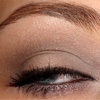
Oh and I'll show you a picture before I edit it....
I hope that helps!
Sep 24, 2011
Emily H.
Sorry the pictures are blurry.... :(
Sep 25, 2011
Lindsay T.
Yay! Thanks Emily!! xoxo
Sep 25, 2011
Lindsay T.
Emily...I know what I am going to be doing for a little while! Thank you! And Amanda, it doesn't require a lot of editing to the point that it's not even your look anymore! It's fabulous!
Sep 25, 2011
Nikki B.
play around with the settings on your camera, try changing the hue, there is usually a vibrancy or color setting, also try changing the exposure. When I first got my camera it made me look supper pale and blue with the flash and I had to play with the settings and you may need to change settings depending if you use flash or not.
Sometimes it takes 20-50 pics before I get it right and one I like.
Also if your taking pics of your eye up close try using the macro setting, it will help to focus better when the camera is up close. usually indicated by a pic of a flower o cameras.
Sep 25, 2011
Heather H.
Like what Amanda said, using a flash can really wash the colours out so try turning it off. It's best to take the photos in natural light, without the flash. Play with your camera's white balance settings (WB) to see what looks the most natural in your lighting situation. It's best to use a manual setting if you can look up how to in your manual.
Along with Nikki, I take a TON of photos.
Usually with those basic techniques I really don't have to do too much tweaking in photoshop.
Sep 25, 2011
Lindsay T.
Thanks everyone for the tips!
Sep 25, 2011
Binks B.
I know some people photoshop their pictures :)